To connect Kotak Neo with SurendraAlgo, you take four steps:
Create an app in the Trade API section of Kotak Neo.
Register TOTP.
Set an MPIN.
Add Kotak Neo in SurendraAlgo's broker setup using your access token.
After that, you log in once each trading day with your TOTP and MPIN.
Orders that SurendraAlgo sends to Kotak Neo go through the Kotak Neo Trade API. On Kotak Neo's Trade Free plans, these API orders have ₹0 brokerage, and the Trade API itself is free to use.
This guide follows the current Kotak Neo setup with TOTP, the same flow as the SurendraAlgo documentation. Once you're connected, SurendraAlgo lets you backtest, paper trade and automate strategies on your Kotak Neo account.
Pay ₹0 brokerage on API orders with Kotak Neo. Create your free SurendraAlgo account and connect your Kotak Neo account.
Kotak Neo API Charges When You Trade Through SurendraAlgo
SurendraAlgo places your orders through the Trade API, so ₹0 brokerage applies to orders from your SurendraAlgo strategies.
Kotak Neo lists one exception: the square-off leg of a bracket order attracts standard brokerage.
You can check the latest terms on Kotak Neo's Trade API page.
What You Need Before You Start
You need an SurendraAlgo account.
You need an active Kotak Neo trading and demat account with F&O enabled.
You need your registered mobile number nearby for OTPs.
You need an authenticator app, such as Google Authenticator, on your phone.
How to Connect Kotak Neo With SurendraAlgo: Step by Step
Step 1: Activate the Kotak Neo Trade API
Log in to the Kotak Neo web terminal.
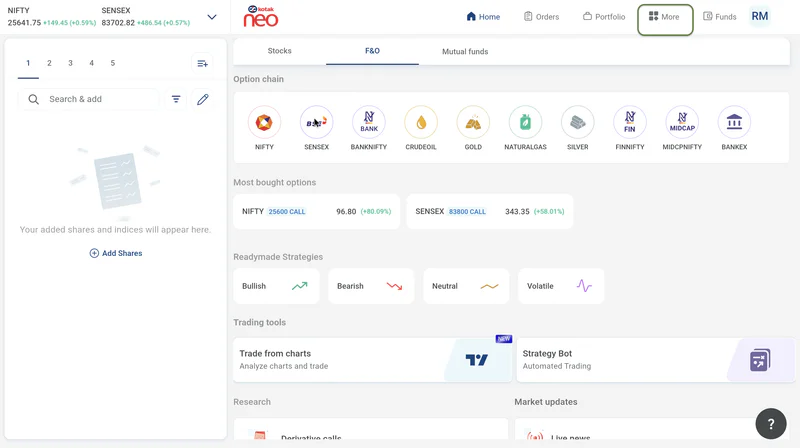
Click More on the top menu bar.
Click Trade API.
Click Create your first application.
Kotak Neo creates an app named "Default Application" with a Token under it. Copy this token and keep it safe, because you need it in Step 4.
Step 2: Register TOTP
TOTP is a 6-digit code from an authenticator app that changes every 30 seconds. Kotak Neo uses it to confirm it's you when you log in through the API.
Open Kotak Neo's TOTP registration page.
Enter your registered mobile number and click Proceed.
Enter the 4-digit OTP sent to your phone.
Select your Client ID and click Continue.
Select Register TOTP and click Continue.
Scan the QR code with Google Authenticator.
Enter the code shown in the app and click Continue.
When it works, you'll see the message "TOTP registered successfully."
Step 3: Set Your MPIN
Kotak Neo needs your MPIN to create the daily access token for API trading.
Log in to the Kotak Neo web terminal.
Click your initials in the top-right corner, then Account Details.
Scroll to the MPIN section at the bottom and set a new MPIN.

Step 4: Add Kotak Neo in SurendraAlgo
Log in to SurendraAlgo and open Broker Setup.
Search for Kotak Neo.
Enter a Connection Name. This can be any name you like.
Paste the Access Token you copied in Step 1 and save.
Go to the All Brokers page and find your Kotak Neo connection.
Enter your Client ID, registered phone number, the current TOTP from your authenticator app and your MPIN.
Click Login with Kotak.
Once you're logged in, your Kotak Neo account is connected to SurendraAlgo.
Logging in each trading day
Your Kotak Neo access token is created fresh each day. Each morning, open the All Brokers page in SurendraAlgo and log in again with a new TOTP and your MPIN before your strategies run.
Connected? Backtest your first strategy before you send a live order to Kotak Neo.
Good to Know About Algo Trading on Kotak Neo
Under SEBI's retail algo rules, Kotak Neo does not accept plain market orders through the API. Instead, it converts them into limit orders with a protection price based on the last traded price.
Option orders can be rejected if the last traded price isn't available, which can happen in illiquid strikes.
The Kotak Neo Trade API supports up to 10 orders per second.
API access is for your own account only, so never share your access token, TOTP or MPIN with anyone.
What to Do After You Connect Kotak Neo
Connecting your broker is the first step. Before you trade live, test the strategy:
Build your strategy in the Strategy Builder by setting the strikes, entry time, exits and stop-loss for each leg.
Backtest it on historical data to see its win rate, drawdown and returns after costs.
Forward test it with paper trading to see how it behaves in live markets without real money.
Deploy it live, and SurendraAlgo sends the orders to your Kotak Neo account through the Trade API.
Kotak Neo is one of several brokers for algo trading in India with a free trading API. If you're still comparing platforms, our list of the best algo trading software in India shows how SurendraAlgo compares.
Common Kotak Neo Connection Issues and Fixes
If SurendraAlgo says your TOTP is invalid, set your phone's date and time to update automatically, then enter a fresh code before it expires.
If you can't find your access token, open Trade API in the Kotak Neo web terminal and copy it from Default Application.
If you've forgotten your MPIN, set a new one under Account Details in the Kotak Neo web terminal.
If your F&O orders are rejected, check that F&O is enabled on your Kotak Neo account.
If an order is rejected for price reasons, remember that Kotak Neo converts market orders to limit orders with a protection price under SEBI's rules.
For anything else, reach the SurendraAlgo team on the execution helpline.
Put Your Kotak Neo Account to Work With Tested Strategies
With Kotak Neo connected, you can turn a trading idea into clear rules: what you trade, when you enter, when you exit and how much you risk. Test those rules on past data and in live markets before you put money behind them. Every order the strategy sends then goes through at ₹0 brokerage.
SurendraAlgo helps you move from an idea to a strategy you can inspect and test before deciding whether to deploy it.
Join us as we simplify algo trading in India.
Related Reading
FAQs About the Kotak Neo API
1. Is the Kotak Neo Trade API free?
Yes. Kotak Neo currently offers its Trade API free of cost.
2. Is brokerage zero on Kotak Neo API orders?
Yes, on Kotak Neo's Trade Free plans. Orders placed through the Neo Trade API, including orders sent by SurendraAlgo, have ₹0 brokerage. Exchange charges, STT, SEBI fees, stamp duty and GST still apply.
3. How do I get my Kotak Neo API access token?
Log in to the Kotak Neo web terminal, go to More, then Trade API, and create an application. The token appears under Default Application.
4. Why does SurendraAlgo ask for my TOTP and MPIN?
Kotak Neo uses your TOTP and MPIN to log you in through the API and create the access token for that trading day.
5. Do I need to log in to Kotak Neo every day?
Yes. Log in from SurendraAlgo's All Brokers page each trading day with a fresh TOTP and your MPIN.
6. Can I place market orders through the Kotak Neo API?
Not as plain market orders. Under SEBI's retail algo rules, Kotak Neo converts them into limit orders with a protection price based on the last traded price.
7. Are Kotak Securities and Kotak Neo the same?
Kotak Neo is the trading platform of Kotak Securities. The broker now uses the Kotak Neo name for its app, web platform and Trade API.
8. How many orders per second can I place with the Kotak Neo API?
The Kotak Neo Trade API supports up to 10 orders per second.